

Email Attachment Through PeopleSoft Now Possible
We are pleased to share a highly requested enhancement that is now available in PeopleSoft. Faculty can now email students directly from the Class Roster and include file attachments. This improvement has been one of the top faculty requests since PeopleSoft was implemented, and we are glad to make this workflow easier and more efficient.
How to Email Students with Attachments
You can send a message with one or more attachments by following the steps below:
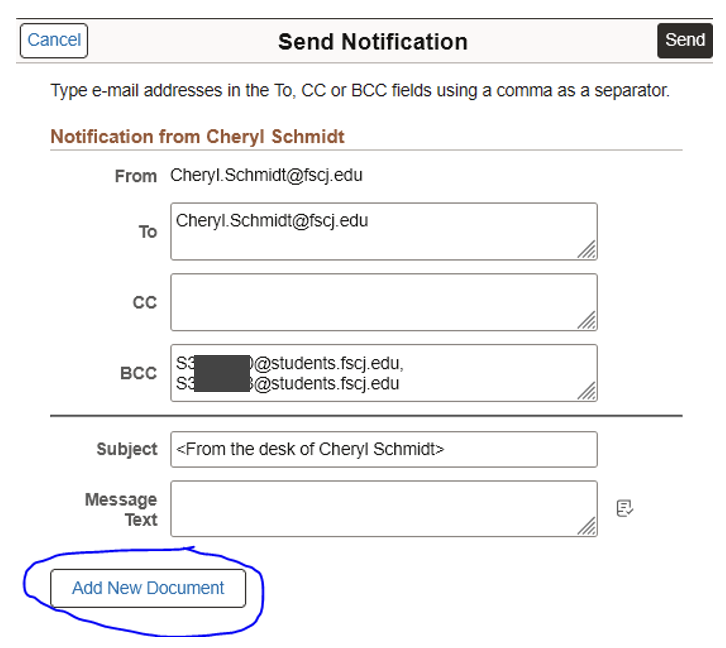
Select the checkbox next to each student you wish to email, or select the ID checkbox in the top left corner of the roster to choose all students.
Select the Add New Document button.
Browse for the document you want to attach.
Select Upload.
Select Send to deliver your message and attachments.
You may attach multiple files if needed.
Please be mindful when contacting a large group of students via email, putting recipients in Bcc helps protect their contact details and lowers the chance of a reply all chain. It also adds a layer of privacy if someone accidentally sends a reply all message that contains sensitive information.
Thank you to everyone who provided input and advocated for this improvement. We hope this new feature supports smoother communication with your students. If you have any questions, please contact the IT Service Desk.
