

Canvas Course Archival Reminder
The Education Technology team is sharing a reminder regarding our routine Canvas Course Archival and Deletion schedule. As part of our ongoing data retention and security policy, courses that have reached their retention limit will proceed to the next phase of archiving and deletion.
Archival Timeline
Our approach includes two key phases:
Initial (Soft) Archival : Courses will be archived five years after the conclusion of their term. This process is designed to ensure courses remain accessible for a significant period before any permanent action is taken. This soft archival period will occur at the end of the Fall 2026 term (August 23rd, 2026). After this time period, courses will no longer be accessible to instructors in Canvas, however, the administrative team will have access to the files if needed.
Final Deletion: One Year after the initial archival phase, these soft-archived courses will be permanently deleted from Canvas. The full deletion of this set of soft archived courses will take place on December 18th, 2025. After this date, courses will no longer be accessible.
Roles and Responsibilities
Ensuring a smooth archival cycle is a shared effort between the EdTech team and Faculty to keep our Canvas environment secure while protecting valuable instructional resources.
Canvas Administrator: Manages the SIS import process and the execution of both archival and deletion phases.
Instructors: Responsible for reviewing and backing up any materials they would like to maintain before the archival dates.
How Instructors Can Prepare
To have access to courses beyond the archival period, you may decide to export your Canvas course content. These exports can be stored in Microsoft OneDrive or on your local computer.
Export a Course from Canvas:
Navigate to the course in Canvas
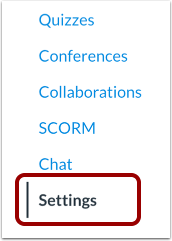
Select Settings from the course menu
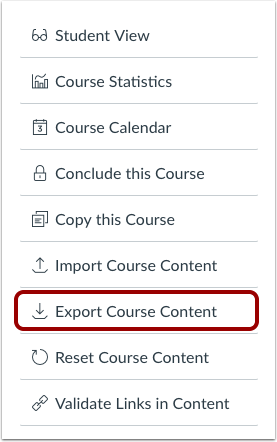
On the right side of your screen, select Export Canvas Course
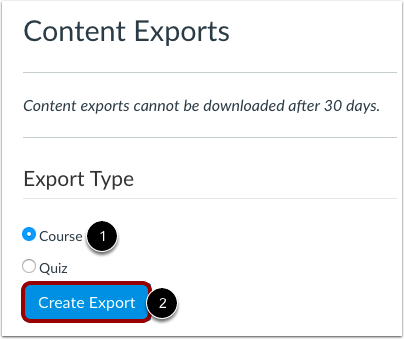
Select the Export type, which will be Course, and then Create Export
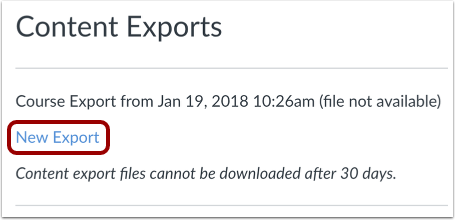
Once complete, select the New Export link to download to your desired location
What IS Included with Export:
All course content including LTI/EdTech Tool placements
What’s NOT Included with Export:
External tool information are not included
Course enrollments are not included
Student data or submissions are not included
For more information, enroll in FSCJ’s micro-learning course ML 2172 How to Export a Canvas Course.
Maintaining our routine archival process ensures our Canvas environment remains efficient, uncluttered, and compliant with institutional data standards. We appreciate your continued partnership in keeping your course archives current, reviewing your materials, and supporting these established best practices. If you need any assistance backing up or exporting your content, the Educational Technology team is here to help.
As always if you have any questions about this process, please reach out to EdTech@fscj.edu